| Bookmark Name | Actions |
|---|
Introduction
ⓘContent enriched:New structure and revised (Docs 2.0)
A guarantee is an undertaking by one party (the guarantor) to stand behind specific obligations (current and future) of a third party (Principal). The Guarantor agrees to compensate the Beneficiary of loss (up to a specified amount) when the third party (Principal) defaults or fails to fulfill the obligations under the guarantee.
A guarantee is:
- A security for performance of a contractual obligation
- An irrevocable undertaking from a guarantor
- A commitment independent of the obligations of its underlying contract
- A guarantor’s assurance towards beneficiary whereby the guarantor replaces the client’s (principal’s or applicant’s) credit worthiness with its own
- The guarantor undertakes to pay a specific sum of money to the beneficiary in the event of non-performance or default by the client (principal or applicant).
Understanding Guarantees in Temenos Transact
The Miscellaneous Deals (MD) module provides the facility to record guarantee undertaking, which are off balance sheet. The principal amounts involved are booked as contingent entries. Temenos Transact uses the MD module to record different guarantee type transactions on the banks’ books. These range from straight forward guarantees (issued and received) to more specific trade finance related deals (bid and performance bonds). It allows forward dated contracts and collection of charges using standard FT.CHARGE.TYPE and FT.COMMISSION.TYPE tables respectively. Additionally, customised delivery advices can be generated. The MD.DEAL contracts can be linked to the LIMIT and COLLATERAL modules and this parameter setting can be changed at the contract level.
The types of deals that are entered in MD.DEAL are related to contingent liability or assets. The main feature is that the risk is recorded off balance sheet otherwise known as below the line. There are options to utilise the LIMIT updates at contract level, ability to levy charges or commissions and the number of deal types that can be entered.
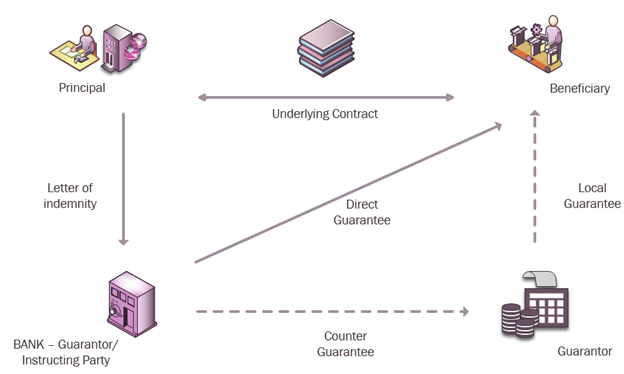
The below shown is letter of guarantee cycle:
Configuring MD.DEAL
The configuration required for MD.DEAL is defined in the below parameter tables:

MD.PARAMETER
The foundation block for the MD module is the MD.PARAMETER table. The MD.PARAMETER record is set for each COMPANY in Temenos Transact. For example, US0010001.
Each bank has one record of this file, and for each company the bank can create a parameter file. This application provides the user with an option to specify where the accounting entries are passed, what accrual cycles are set, and the transaction codes are used in Temenos Transact. Valid deal types, deal sub types and category code ranges are set up. Overall, level rules are specified.
Some of these fields are explained below:
Basic Types (Contract Type)
The following are basic types of contract based on which all deal types are created:

The difference between contingent and memorandum type is negligible. Memo type is considered as the softer type of deals. Exact usage of these types will be at the discretion of user.
EXAMPLE: When the banks are issuers cum beneficiaries, such guarantees are termed as memorandum items. All deal types created should be based on these and should be specified in
MD.PARAMETER.User Types (Deal Subtypes)
Within the each of the four main types there are user defined sub-types called deal sub types. They have their own range of category codes but must be within the overall range defined for the main type. The user has to enter the ranges in Contract Type field based on the deals within the four basic types discussed above. The CATEGORY range enables the bank to add new products that are introduced in the future. Suggested category code ranges from 28000 to 28999. The category range cannot be changed after MD.PARAMETER is authorised.
The category of a MD can be changed after the authorisation, but within the range meant for the deal sub type. Care should be taken while defining the deal sub types and allocating category ranges so that sufficient detail does not already exist to provide the required breakdown. The CATEGORY codes should not be defined separately for resident and non-resident customers or for local and foreign currency transactions, since this information is already available on an individual prime record.
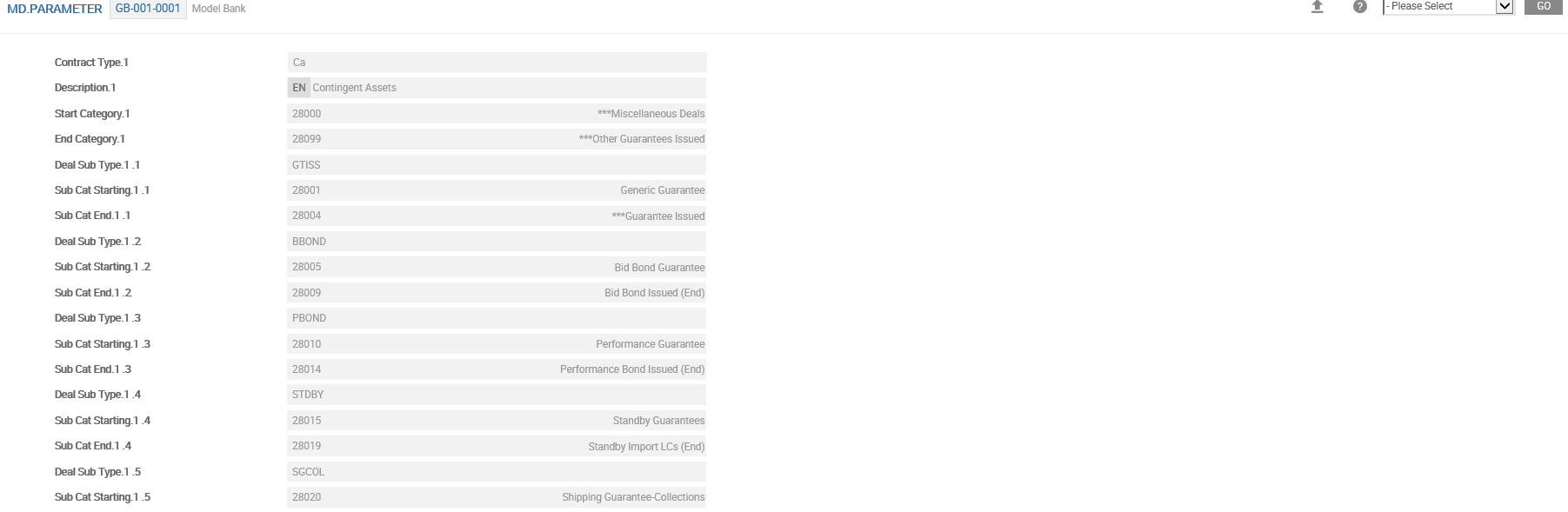
A simple deal sub-type structure is illustrated below, where a new sub-type of guarantee can be added later to the respective contract yype.

In the above screentshot:
| Type | Description |
|---|---|
| CL | Contingent Liability |
| CA | Contingent Asset |
| ML | Memorandum Liability |
| MA | Memorandum Asset |
EXAMPLE: BBOND for bid bond, PBOND for performance bond guarantee.
The category code range for each of these sub types are indicated in Sub Cat Starting and Sub Cat End in MD.PARAMETER fields. These category codes should be within the range meant for the respective contract type.
Accrual Cycle
MD uses P&L category codes for accrual of charges and commission. The Accrual Cycle field defines the cycle for accruing time-based commission. The frequency can be set to Daily, Weekly or Monthly. The format of the value entered in this field is <accrual start date followed by the standard frequency code>. For example, DAILY/BSNSS or WEEK1 to WEEK9 or M01 to M12.
Only when a value is entered in this field, the commission schedule accruals are performed. The user is not allowed to leave this field blank once value has been entered and authorised. When the system performs commission accruals, the date on which the accruals are posted is updated and displayed in this field. Respective P&L category codes for accrual of time-based commission can be set up in the Current Accrual, Previous Month and Previous Year fields.
The category code entered in the Current Accrual field is used for posting the current month accruals related to the commission based fees allowed in MD contracts. The value in this field cannot be changed once authorised. However, New Current field can be used to amend the value. This will trigger a system change and rebuild the financial information produced by MD. The Previous Month field is used to define category used for posting the accruals of the previous months. The value in this field cannot be changed once authorised.
The Previous Year field is used to set category for posting the accruals of previous year. The value in this field cannot be changed once authorised. The P&L category code must be a valid code ranging from 50000 to 59999. The below screenshot shows the Contract Type CA broken down into different sub-types for specific usage.
Events Processing
Allowed values are Online or End of Day. When set to,
- Online (for negative principal movements) – The limit is updated dynamically for same day, even for negative principal movements. Customer position is updated and contingent entries are raised online for new deals, reversals, same day principal movements and change in principal movements.
- End of Day – The contingent entries are raised only during Close of Business(COB). Limit updation for principal decrease takes place during COB. Limit updation for decreases and accounting entries for changes to principal done only during COB.
Process at SOD
The system performs accrual or amortisation of commission at the end of day batch, based on the details of commission setup in each MD.DEAL. The system capitalises the commission amount based on the value at the contract level, (Process At Sod and Liquidation Mode) irrespective of the value at the parameter level. Allowed values are Yes or No. When set to,
- Yes – The process takes place during the start of day
- No – The process takes place at the end of day
Maturity
The bank might want to keep the record in live status, even after the maturity till they receive the original guarantee issued. Temenos Transact provides an option to keep the deal live until the original guarantee is returned. This means that even after the maturity date, the deal stays with the status CUR and LIQ, unless the user sets the Auto Expiry field to Yes in MD.DEAL. This can be controlled from the parameter or record level. For example, even after the expiry, a guarantee can be kept in the live file, until the original guarantee is received on hand.
Expiry Mode
Allowed values are Manual or Automatic and when set to,
- Manual – The guarantee will continue to be in live file even after maturity and has become null and void. This prevents the record to move to history. The Auto Expiry field in
MD.DEALtable is defaulted to No. However, this can be overridden at the deal. This caters to scenarios where the record is live until the original guarantee is returned. - Automatic – The Auto Expiry field in
MD.DEALis defaulted to Yes. On maturity, the record moves to history after the number of days mentioned in the Days Post Maturity field.
1 to 999 working or calendar days can be mentioned as NW/NC. For example, 3 Working days are entered as either 3W or 03W and 5 Calendar days as 5C or 05C.
Understanding Provision
Include Provision
Impact on limit could be set to less provision amount taken (if any), by setting Include Provision field. Allowed values are Yes or No and when set to,
- Yes – The impact on limit will be reduced to the extent of the provision taken against the deal.
- No – Irrespective of any provision taken for the deal, the limit will get hit for the entire principal amount of the deal (full guaranteed amount of the leader’s portion). The value entered in this field will be defaulted in the deal. A NULL value however, is treated as No.
Prov Category
Provision can be credited to an internal account. If the credit provision account is not defined in the deal, then an internal account created under the category (10000 – 19999), in which the margin money or cash margin is to be parked. The category code in which the default internal account to be opened is entered in Prov Category field. An internal account is opened in local currency in this category. Temenos Transact automatically creates accounts for other currencies whenever needed.
Prov Netting
The feature of netting the proportionate provision amount to be released with the invocation amount and debit the balance amount from the invocation debit account can be setup. The user can choose to net the accounting entries, at the time of payment of invocation amount. Allowed values are Yes or No and when set to,
- Yes – The user can net the provision release entry with the debit invocation account entry at the time of executing invocation.
- No – The user cannot net the provision release entry with the debit invocation account entry at the time of executing invocation. The system defaults the value to No, when the user does not define it.
Transaction Codes
The transaction code that is used in the accounting entries during debit or credit provision, commission or when a contract is invoked is defined.
- Crediting and debiting provision amounts in Tr Prov Code Cr and Tr Prov Code Dr
- Paying and receiving time based commission in Csn Pay Txn Code and Csn Rec Txn Code
- Crediting and debiting during invocation in Tr Inv Code Dr and Tr Inv Code Cr
Participant’s Commission
In case of syndicated lending for non-funded limits, participant’s share in the commission is temporarily parked in an internal account with category code defined in Part Csn Acc field.
Liability under a Shipping Guarantee
When a shipping guarantee is issued against an import LC, the guarantee limit is also updated in addition to the existing LC liability duplicating the customer's liability. LC liability is reversed when the drawing under the LC is settled and the guarantee liability is reversed on the maturity of the guarantee contract. The Reduce LC Liab field is used to shift the liability from LC to guarantee instead of duplicating the liability entries in both LC and guarantees. Allowed values are Yes or No and when set to,
- Yes – The system automatically create SG type of drawings under LC, thus reversing the LC liability and updating the guarantee liability.
- No – The existing functionality of updating the guarantee liability in addition to the LC liability continues. The user cannot amend the value once defined. The system defaults the value No, if not defined by the user.
Understanding Limit
The parameter table determines whether the limit should be updated and later checked or blocked at individual deal level. For example, the user may opt not to set up limits for guarantees received from customers. Complete flexibility is available to classify miscellaneous deals into asset and liability products and further into those requiring limit checking.
Separate rules for limit checking can be set if limit has to be made Mandatory, Optional or No input using choices available in respective fields Cont Limit Link, Memo Limit Link, CL Limit Link and ML Limit Link. The Cont Limit Link field indicates the relationship of deal amounts for Contingent Assets (contract type CA) within the LIMITS system. This parameter determines whether an entry has to be made in the Update Limit and Limit Reference fields of a contingent asset MD.DEAL.
The Memo Limit Link field indicates the relationship of Memorandum Assets (contract type MA) with the LIMITS system. This field determines whether an entry has to be made in the Update Limit field and Limit Reference field of a memorandum MD.DEAL. The CL Limit Link field indicates the relationship of Contingent Liabilities (contract type CL) with the LIMITS system. This field determines whether an entry has to be made in the Update Limit field and Limit Reference field of a contingent MD.DEAL. The ML Limit Link field indicates the relationship of Memorandum Liabilities (contract type ML) with the LIMITS system. This field determines whether an entry has to be made in the Update Limit field and Limit Reference field of a memorandum MD.DEAL.
NOTE: If the user leaves these fields blank it is the same as selecting 'Optional'.
Limit if available to Internet Customer
The value in this field decides the stage at which the internet banking customer's limit must be updated when request for issuance of guarantee is initiated through internet banking. Allowed values are Yes or No and when set to,
- Yes – The system checks and updates customer's limit, when the corporate customer requests for issuance of guarantee through internet banking.
- No – The customer's limit is checked and updated only when the request is approved at the banks side.
Soft Delivery
In order to have a soft delivery option for messages, Md Class Type and Eb Class Type fields are setup. To preview messages in soft delivery, Preview is mentioned in the Additional Info field in PGM.FILE for the record MD.DEAL.
When Backward Delivery field is set to Yes, the system continues the old delivery set-up. This field is set to No, for new implementations. Md Class Type and Eb Class Type multi value fields are necessary for soft delivery set up.
NOTE: It is recommended to define values during initial system build so secondary build stage can take care of soft delivery.
Rounding Rule
In a deal, when debit and credit currency are different, treasury or default buy or sell rate is used for converting amounts, for which a rounding rule can be applied. The default in Temenos Transact is natural rounding. However, the Rounding Rule field in MD.PARAMETER is used to setup new rounding rules. Rounding rule is first setup in the EB.ROUNDING.RULE application and then entered into Rounding Rule field.
Similarly, using the Csn Acct Roundg Rule field in the MD.DEAL application, the user can specify the rounding type for the calculation of commission. Values entered in this field at application level will override the conditions defined at product level. If the rounding types are not defined in these fields, then it takes place as defined at the product level. Other methods defined in EB.ROUNDING.RULE are attached to the Rounding Type field.
Refund of Charges and Commission/Write-off Claimed Commission
While issuing a guarantee, charges and commissions can be collected at the time of issue or can be scheduled to be taken at a future date. When commission is claimed on the guarantee, the claiming commission amount is recorded in MD.BALANCES application and the commission details are defaulted in a new application where the user transacts the settlement of claimed amount.
The system defines the P&L category code for accounting when already collected charges which have not been amortised and those which have, and commission, either time based or fixed, are refunded or written-off in case of a claimed commission. MD.FEE.SETTLEMENT is used to settle, write-off and refund the commission as well as charges. However, write off and refund category code is defined in the parameter level.These category codes are used to account write-off and refund of commission transactions
Claim Wof Cat field holds the P&L category to be debited while writing off the unsettled claimed commission. Refund Category field holds the P&L category to be debited for the refund of realised portion of commission or charge.
Reinstate a MD Contract
It is possible to reinstate a contract from LIQ to CUR status and it allows all actions that can be performed on a live contract. This option allows user to process the invocation claim and extend the maturity date of the guarantee, when the system date crosses the original maturity date before the contract matures.It allows to reinstate a guarantee after expiry of the contract from EXP to CUR status.
The following fields in MD.PARAMETER caters to the requirement of reinstating a guarantee after expiry:
- The number of days entered in the Expiry Days field by the user is used to calculate the maturity date from the Advice Expiry Date. If this field is amended, then it will be applied only to the new contracts. This is an optional field with the format as nnnC or nnnW where,
- nnn – number of days from 1 to 999
- C – calendar days
- W – working days
- Value entered in the Csn Period field decides the end date for calculating time based commission at the contract level.
Days to settle Invocation
- The information in this field defines the number of days within which a decision has to be taken for any invocation claims received. This is used under enquiries.
- Accepts valid days format - +NNX; where,
- n stands for two numeric digits representing the number of days
- X denotes the calendar days (C) or working days (W)
- This is an optional input field.
- Enquiries are created to list the guarantees with outstanding claims, for which decision has to be taken within the specific period.
Rate Change
This field indicates whether commission rate change can be done at the contract level or through MD.CSN.RATE.CHANGE application. Allowed values are Yes or No.
Payment using PAYMENT.ORDER
To enable the settlement of guarantee claims through PAYMENT.ORDER, an initial setup is done in the PAYMENT.ORDER.PRODUCT table and linked to MD.PARAMETER.
PAYMENT.ORDER.PRODUCTis defined for MD application as below- The
PAYMENT.ORDER.PRODUCTcreated is linked inMD.PARAMETER - A corresponding Poa Wash Categ is defined for the
PAYMENT.ORDER.PRODUCTinMD.PARAMETERtable.
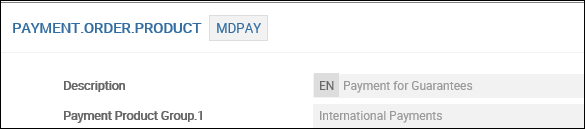

Poa Wash Categ and Payment Order Product fields in the MD.PARAMETER is defined for linking the POA, for settlement of the guarantee claim in MD.DEAL.
Fields in MD.PARAMETER |
Values in the Field |
|---|---|
| Poa Wash Categ | Valid PO wash account category code as defined in
the CATEGORY table |
| Payment Order Categ | Valid record ID of the
table PAYMENT.ORDER.PRODUCT |
The Poa Wash Categ lists all the internal account category codes. This field identifies the category code of the internal wash account to which the proceeds under the MD are taken for settlement, When the payment method is N in DRAWINGS application.
When the Invocation Status field is set to Execute and Claim Payment Method field is set as N in MD contract and Payment Order option is set as Yes, the system credits the internal wash account, which was formed using the category code defined at the parameter level. The Temenos Transact system creates a PAYMENT.ORDER record and the reference is updated in MD.DEAL. The MT202C and MT103 messages are suppressed at this stage.
The value entered in the Payment Order Product helps in mapping the payment order product in PAYMENT.ORDER.PRODUCT, MD and FUND.TRANSFER applications. The record ID of PAYMENT.ORDER.PRODUCT table is a valid input for Payment Order Product field in the MD.PARAMETER table.
Mapping MT103 from MD to PAYMENT.ORDER
Mapping from PAYMENT.ORDER application to MT103 fields are provided as per below. The mapping is the key step as a part of the set up for generating the payment messages. MD.DEAL application uses the message type MT103 as one of the delivery messages. The fields from the MD.DEAL are mapped to the respective fields in PAYMENT.ORDER record to enable the generation of the MT103 from the PAYMENT.ORDER application.
| MT103 TAG | PAYMENT.ORDER Fields |
MD Fields
|
|---|---|---|
| 20 | Instruction Id Ref |
ID of MD.DEAL record |
| – | End To End Reference |
ID of MD.DEAL record |
| 33B | Payment Amount | Invocation Amount |
| 33B | Payment Currency | Ccy |
| 50 | Ordering Cust Name | ordering customer (own bank short name) |
| 50 | Ordering Post Address Type | – |
| 57 | Acct With Bank Bic | Account with Bank (SW-XXXXXX) |
| 57 | Acct With Bank Swift Addr.1+ Acct With Bank Swift Addr.2 | Account with Bank (When there is no SWIFT ID) |
| 59 | Beneficiary Name | 2/<Beneficiary Name> |
| 59 | Ben Post Addr Line | 3/<Beneficiary> |
| 59 | Beneficiary Country Code | 4/<Country Code> |
| 57 | Credit Acct | Account with Bank (SW-XXXXXX) |
| 57 | Beneficiary Account No | 1st line of Beneficiary Customer |
| 72 | Remittance Information | Sender to Receiver Information |
| 32A | Required Credit Value Date | Claim Credit Date |
| 56 | Intermed Bic | Intermediary Bank (No SWIFT ID) |
| 56 | Intermed Bank Postal Addr Type | Intermediary Bank (No SWIFT ID) |
| 56 | Intermed Bank Customer Name | Intermediary Bank |
| 72 | Bank To Bank Info | Sender to Receiver Information |
NOTE: This feature is available only when the payment method is selected as Nostro in MD
Understanding MD.CLAUSES
Banks ensure that clauses are framed in such a way that they clearly define the content and extent of its obligations towards the beneficiary. It is vital that the text of the guarantee provides absolute clarity as regards the nature of security. MD.CLAUSES are records created for customer specific purpose. It contains the full clause text, which is used in the construction of MD advices or documents generated under the transaction.
MD.CLAUSES table stores standard conditions required for different guarantees. To reduce time while entering a guarantee, the content in Details of Guarantee field in the MD.DEAL can be defaulted from MD.CLAUSES by entering ID of this record. Details of Guarantee field is a multi-valued field. It is advisable to keep a meaningful Id to remind the nature of clauses. Full description can be recorded in the Description field.
Understanding MD.TXN.TYPE.CONDITION
MD.TXN.TYPE.CONDITION table facilitates defaulting provision and commission percentage. It ensures the collection of minimum commission amount for the guarantees issued. The default commission thus collected is defined currency-wise. In the absence of any default value for a given currency, the local currency equivalent is computed and applied.
- Similarly, the percentage of commission is defined for any
CATEGORYmentioned in the Deal Sub Type field and the same is defaulted in the deal. The definition of commission percentage becomes mandatory ifMD.CSN.RATE.CHANGEis invoked. - To ensure the recovery of a minimum amount of commission for any deal, a bank can use Min Comm Tenure field. Value entered in this field indicates the minimum tenure represented in days, for which commission is to be calculated. To ensure that a minimum amount of commission is recovered for any Deal, Min.Amount and Min Comm Tenure fields are used.
- When the resultant commission of a deal is greater than the default value, the computed value stays.
- When the resultant commission of a deal is greater than the default value, but the tenor is less than the default value, the computed value stays.
- When the resultant commission of a deal is less than the default value, but the tenor is greater than the default value, the default commission is taken.
- When the resultant commission of a deal is less than the default value and the tenor is less than the minimum period, the commission is recalculated for the default period.
- If this commission is greater than the default commission, it is applied else, the default commission is applied.
- This default commission is defined currency-wise. In the absence of any default value for a given currency, the equivalent of the local currency is computed and applied.
- The percentage of commission for any
CATEGORYunder a Deal Sub Type can be defined and that will be defaulted in the deal. This definition of commission percentage becomes mandatory ifMD.CSN.RATE.CHANGEapplication is to be invoked.
Understanding APPL.GEN.CONDITION
The bank can establish a percentage for a contract group. If required, user may stipulate different provision rates for the same category of guarantee. For example, deal amount-wise.
NOTE: While defining the groups, the user has to ensure that the same contract does not fall in two different groups. If so, the first fit will be returned and the grouping may be defected.
APPL.GEN.CONDITION can be used to allocate group codes based on a number of defined conditions and/or local routines for any Temenos Transact application with a STANDARD.SELECTION record for the application. Hence, banks can form different groups for different treatment of charges.
EXAMPLE: Forming a group for people residing in the US. This can be done by entering the name of the group as USERS in the Contract Group field with condition as RESIDENCE EQ US
The APPL.GRP.CONDITION subroutine is called to evaluate the current contract record using relevant APPL.GEN.CONDITON. It will return the first group code where all decision checks evaluate to true. This application can call the evaluation routine from VERSION routines to update local reference fields with the relevant group code.
Understanding MD.GROUP.CONDITION
The Group Id is defined in the APPL.GEN.CONDTION for the MD application. For example, NON-RESIDENT of C-XXXXXX, where XXXXXX is the Customer ID.
The MD.GROUP.CONDITION application can default the following values:
- Applicant’s default provision percentage and the respective debit and credit provision accounts (if applicable).
- Applicant’s commission schedule details such as Csn Perc, CSN Rate, Csn Ccy and CSN Amount.
MD.GROUP.CONDITION is used for setting up provision percentage of a particular group, deal subtype-wise and category-wise. Group ID defined in APPL.GEN.CONDITION is the ID for MD.GROUP.CONDITION. Additionally, C-1001 will be accepted as ID, where the customer number is 1001. The specific condition for the customer is defined .
When Provision % field in MD.DEAL is set to Yes, the related fields will open up in MD.DEAL. The user can define the account from which provision is to be taken using Debit Prov Acc and into which it is to be kept using Credit Prov Acc fields in MD.GROUP.CONDITION.
The user can define the date on which the provision is to be released using Provision Release Date field in MD.DEAL. Though the default release account is indicated in Debit Prov Acc field in MD.GROUP.CONDITION, the user can specify a different account in Margin Release Acct field in MD.DEAL. Commission can be defined in percentage, fixed rate or fixed amount based on category.
Understanding IB Limit
The IB Limit field can be defaulted, if the APPLICANT is a TCIB customer. The value entered in this field decides the stage at which the customer's limit is updated when, request for issuance of guarantee is initiated through internet banking. It is allowed for Internet enabled customers. Allowed values are Yes or No. When set to,
- Yes – The customer's limit is checked and updated when the corporate customer requests for issuance of guarantee through internet banking.
- No – The customer's limit is checked and updated only when the request is approved at the bank's side.
The value defined here will override the condition defined in MD.PARAMETER.
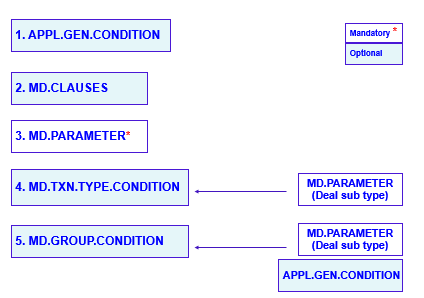
MD Build Sequence
The order in which these files should be created is stored within the automated tool for IM. The order sequence in the ascending build reference order is given in the left. Mandatory tables are indicated with a red star mark and optional tables in blue colour.
Wherever there are dependencies for filling up values in the tables in build sequence, the dependencies are shown on the right.
Add Bookmark
save your best linksView Bookmarks
Visit your best links BACK
BACK


Are you sure you want to log-off?